# Getting OAuth Access Tokens
Getting a Twitch access token through one of the four OAuth flows
Source: https://dev.twitch.tv/docs/authentication/getting-tokens-oauth/
Twitch APIs require access tokens to access resources. Depending on the resource you're accessing, you'll need a [user access token](https://dev.twitch.tv/docs/authentication.md#user-access-tokens) or [app access token](https://dev.twitch.tv/docs/authentication.md#app-access-tokens). The API's [reference content](https://dev.twitch.tv/docs/api/reference.md) identifies the type of access token you'll need. The simple difference between the two types of tokens is that a user access token lets you access a user's sensitive data (with their permission) and an app access token lets you access their non-sensitive data only (and doesn't require the user's permission).
If the APIs you're calling require an OAuth app or user access token, use one of the following flows to get the token:
| Flow | Token Type | Description |
| --- | --- | --- |
| [Implicit grant flow](#implicit-grant-flow) | User access token | Use this flow if your app does not use a server. For example, use this flow if your app is a client-side JavaScript app or mobile app. |
| [Client credentials grant flow](#client-credentials-grant-flow) | App access token | Use this flow if your app uses a server, can securely store a client secret, and can make server-to-server requests to the Twitch API. This flow is meant for apps that only need an app access token. |
| [Authorization code grant flow](#authorization-code-grant-flow) | User access token | Use this flow if your app uses a server, can securely store a client secret, and can make server-to-server requests to the Twitch API. |
| [Device code grant flow](#device-code-grant-flow) | User access token | Use this flow if your app is run on a client with limited input capabilities, such as set-top boxes or video games. |
**NOTE** Third-party apps that call the Twitch APIs and maintain an OAuth session **must** call the `/validate` endpoint to verify that the access token is still valid. [Read more](https://dev.twitch.tv/docs/authentication/validate-tokens.md)
## Implicit grant flow
This flow is meant for apps that don't use a server, such as client-side JavaScript apps or mobile apps.
To get a user access token using the [implicit grant flow](https://datatracker.ietf.org/doc/html/rfc6749#section-1.3.2), navigate the user to `https://id.twitch.tv/oauth2/authorize`. For example, if your service is a website, you can add an HTML hyperlink for the user to click.
`Connect with Twitch`
Specify the following query parameters as appropriate for your application.
| Parameter | Required? | Type | Description |
| --- | --- | --- | --- |
| client\_id | Yes | String | Your app's [registered](https://dev.twitch.tv/docs/authentication/register-app.md) client ID. |
| force\_verify | No | Boolean | Set to **true** to force the user to re-authorize your app's access to their resources. The default is **false**. |
| redirect\_uri | Yes | URI | Your app's registered redirect URI. The access token is sent to this URI. |
| response\_type | Yes | String | Must be set to `token`. |
| scope | Yes | String | A space-delimited list of scopes. The APIs that you're calling identify the scopes you must list. You must URL encode the list. |
| state | No | String | Although optional, you are *strongly encouraged* to pass a state string to help prevent [Cross-Site Request Forgery](https://datatracker.ietf.org/doc/html/rfc6749#section-10.12) (CSRF) attacks. The server returns this string to you in your redirect URI (see the *state* parameter in the fragment portion of the URI). If this string doesn't match the state string that you passed, ignore the response. The state string should be randomly generated and unique for each OAuth request. |
The following URI is an example of the URI that you'll navigate to in your web browser control (the URI is formatted for easier reading).
```
https://id.twitch.tv/oauth2/authorize
?response_type=token
&client_id=hof5gwx0su6owfnys0yan9c87zr6t
&redirect_uri=http://localhost:3000
&scope=channel%3Amanage%3Apolls+channel%3Aread%3Apolls
&state=c3ab8aa609ea11e793ae92361f002671
```
If the user is logged into Twitch, Twitch asks them to authorize your application's access to the specified resources. If they're not logged in, Twitch first asks them to log in and then asks them to authorize your application.
If the user authorizes your application by clicking **Authorize**, the server sends the access token to your redirect URI **in the fragment portion** of the URI (see the *access\_token* parameter):
```
http://localhost:3000/
#access_token=73d0f8mkabpbmjp921asv2jaidwxn
&scope=channel%3Amanage%3Apolls+channel%3Aread%3Apolls
&state=c3ab8aa609ea11e793ae92361f002671
&token_type=bearer
```
**NOTE** In JavaScript, you can access the fragment using `document.location.hash`.
If the user didn't authorize your app, the server sends the error code and description to your redirect URI (see the *error* and *error\_description* query parameters).
```
http://localhost:3000/
?error=access_denied
&error_description=The+user+denied+you+access
&state=c3ab8aa609ea11e793ae92361f002671
```
## Client credentials grant flow
The [client credentials grant flow](https://datatracker.ietf.org/doc/html/rfc6749#section-1.3.4) is meant only for server-to-server API requests that use an app access token.
To get an access token, send an HTTP POST request to `https://id.twitch.tv/oauth2/token`. Set the following x-www-form-urlencoded parameters as appropriate for your app.
| Parameter | Required? | Type | Description |
| --- | --- | --- | --- |
| client\_id | Yes | String | Your app's [registered](https://dev.twitch.tv/docs/authentication/register-app.md) client ID. |
| client\_secret | Yes | String | Your app's registered client secret. |
| grant\_type | Yes | String | Must be set to `client_credentials`. |
The following example shows the parameters in the body of the POST (the parameters are formatted for easier reading).
```
client_id=hof5gwx0su6owfnys0yan9c87zr6t
&client_secret=41vpdji4e9gif29md0ouet6fktd2
&grant_type=client_credentials
```
If the request succeeds, it returns an access token.
```json
{
"access_token": "jostpf5q0uzmxmkba9iyug38kjtgh",
"expires_in": 5011271,
"token_type": "bearer"
}
```
## Authorization code grant flow
This flow is meant for apps that use a server, can securely store a client secret, and can make server-to-server requests to the Twitch API. To get a user access token using the [authorization code grant flow](https://datatracker.ietf.org/doc/html/rfc6749#section-1.3.1), your app must [Get the user to authorize your app](#get-the-user-to-authorize-your-app) and then [Use the authorization code to get a token](#use-the-authorization-code-to-get-a-token).
### Get the user to authorize your app
The first step is to get the user to authorize your application's access to their resources. To get the authorization, in your web browser control, navigate the user to `https://id.twitch.tv/oauth2/authorize`. For example, if your service is a website, you can add an HTML hyperlink for the user to click.
`Connect with Twitch`
Specify the following query parameters as appropriate for your application.
| Parameter | Required? | Type | Description |
| --- | --- | --- | --- |
| client\_id | Yes | String | Your app's [registered](https://dev.twitch.tv/docs/authentication/register-app.md) client ID. |
| force\_verify | No | Boolean | Set to **true** to force the user to re-authorize your app's access to their resources. The default is **false**. |
| redirect\_uri | Yes | URI | Your app's registered redirect URI. The authorization code is sent to this URI. |
| response\_type | Yes | String | Must be set to `code`. |
| scope | Yes | String | A space-delimited list of scopes. The APIs that you're calling will identify the scopes you must list. You must URL encode the list. |
| state | No | String | Although optional, you are *strongly encouraged* to pass a state string to help prevent [Cross-Site Request Forgery](https://datatracker.ietf.org/doc/html/rfc6749#section-10.12) (CSRF) attacks. The server returns this string to you in your redirect URI (see the *state* parameter in the fragment portion of the URI). If this string doesn't match the state string that you passed, ignore the response. The state string should be randomly generated and unique for each OAuth request. |
The following URI shows an example request that you'll navigate to in your web browser control (the URI is formatted for easier reading).
```
https://id.twitch.tv/oauth2/authorize
?response_type=code
&client_id=hof5gwx0su6owfnys0nyan9c87zr6t
&redirect_uri=http://localhost:3000
&scope=channel%3Amanage%3Apolls+channel%3Aread%3Apolls
&state=c3ab8aa609ea11e793ae92361f002671
```
If the user is logged into Twitch, Twitch asks them to authorize your application's access to the specified resources. If they're not logged in, Twitch first asks them to log in and then asks them to authorize your application.
If the user authorized your app by clicking **Authorize**, the server sends the authorization code to your redirect URI (see the *code* query parameter):
```
http://localhost:3000/
?code=gulfwdmys5lsm6qyz4xiz9q32l10
&scope=channel%3Amanage%3Apolls+channel%3Aread%3Apolls
&state=c3ab8aa609ea11e793ae92361f002671
```
If the user didn't authorize your app, the server sends the error code and description to your redirect URI (see the *error* and *error\_description* query parameters):
```
http://localhost:3000/
?error=access_denied
&error_description=The+user+denied+you+access
&state=c3ab8aa609ea11e793ae92361f002671
```
### Use the authorization code to get a token
The second step in this flow is to use the authorization code (see above) to get an access token and refresh token.
To get the tokens, send an HTTP POST request to `https://id.twitch.tv/oauth2/token`. Set the following x-www-form-urlencoded parameters in the body of the POST.
| Parameter | Required? | Type | Description |
| --- | --- | --- | --- |
| client\_id | Yes | String | Your app's [registered](https://dev.twitch.tv/docs/authentication/register-app.md) client ID. |
| client\_secret | Yes | String | Your app's registered client secret. |
| code | Yes | String | The code that the `/authorize` response returned in the *code* query parameter. |
| grant\_type | Yes | String | Must be set to `authorization_code`. |
| redirect\_uri | Yes | URI | Your app's registered redirect URI. |
The following example shows the parameters in the body of the POST (the parameters are formatted for easier reading).
```
client_id=hof5gwx0su6owfnys0yan9c87zr6t
&client_secret=41vpdji4e9gif29md0ouet6fktd2
&code=gulfwdmys5lsm6qyz4xiz9q32l10
&grant_type=authorization_code
&redirect_uri=http://localhost:3000
```
If the request succeeds, it returns an access token and refresh token.
```json
{
"access_token": "rfx2uswqe8l4g1mkagrvg5tv0ks3",
"expires_in": 14124,
"refresh_token": "5b93chm6hdve3mycz05zfzatkfdenfspp1h1ar2xxdalen01",
"scope": [
"channel:moderate",
"chat:edit",
"chat:read"
],
"token_type": "bearer"
}
```
When the access token expires, use the refresh token to get a new access token. For information about using refresh tokens, see [Refreshing Access Tokens](https://dev.twitch.tv/docs/authentication/refresh-tokens.md).
## Device code grant flow
This flow is designed for applications which do not use a server and are located on a stand alone device, such as a set-top box or a video game console.
Device Code Grant Flow (DCF) allows for public and confidential client types. The major [differences](https://datatracker.ietf.org/doc/html/rfc6749#section-2.1) between a public and confidential client type is that public clients:
- Do not need to maintain a client secret.
- Can refresh an access token without passing a client secret.
- Are only limited to the usage of device authorization grant flow to obtain OAuth tokens and cannot use any of the other flows like client credentials, implicit grant flow highlighted [above](#implicit-grant-flow).
Although the public clients do not need a client secret to obtain an access token there are some important details to be noted about the DCF related refresh tokens. For more information about using refresh tokens, see [Refreshing Access Tokens](https://dev.twitch.tv/docs/authentication/refresh-tokens.md):
- These tokens are for **one time use only**, meaning if they are used in refreshing a token they will become invalid after use.
- There is an expiry on the refresh token which is inactive, which is set to **30 days**. After a refresh token expires the user is expected to start the DCF flow once again to obtain a new refresh token. Both the refresh tokens and the access tokens can be stored safely in the user’s device as HttpOnly cookies.
- All access tokens obtained have the same expiry like before, i.e. **4 hours**.
Generally, if you device is secure, then **confidential** is the client type you should use, however if your application is on a more open platform (such as windows) we suggest using **public**.
### Starting the DCF Flow for your user
The first step is to make the following cURL command from your client. This cURL command starts a device authorization grant code flow for your client.
Specify the following query parameters as appropriate for your application.
| Parameter | Required? | Type | Description |
| --- | --- | --- | --- |
| client\_id | Yes | String | Your app's [registered](https://dev.twitch.tv/docs/authentication/register-app.md) Client ID. |
| scopes | Yes | String | A space-delimited list of scopes. The APIs that you're calling identify the scopes you must list. You must URL encode the list. |
```bash
curl -X POST --location 'https://id.twitch.tv/oauth2/device' \
--form 'client_id=""' \
--form 'scopes=""'
```
The response to this call will contain:
| Parameter | Type | Description |
| --- | --- | --- | --- |
| device\_code |String | The identifier for a given user. |
| expires\_in | Int | Time until the code is no longer valid |
| interval | Int | Time until another valid code can be requested |
| user\_code | String | The code that the user will use to authenticate |
| verification\_uri | String | The address you will send users to, to authenticate |
```json
{
"device_code": "ike3GM8QIdYZs43KdrWPIO36LofILoCyFEzjlQ91",
"expires_in": 1800,
"interval": 5,
"user_code": "ABCDEFGH",
"verification_uri": "https://www.twitch.tv/activate?public=true&device-code=ABCDEFGH"
}
```
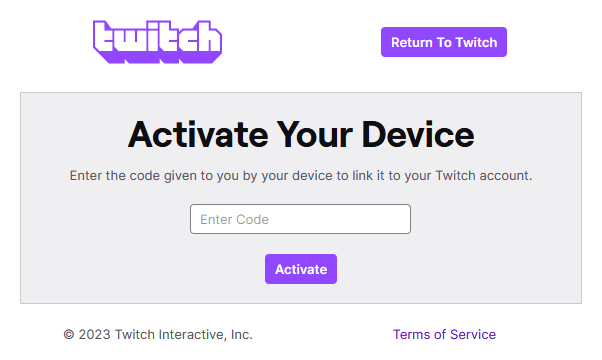
**Authorization Step**
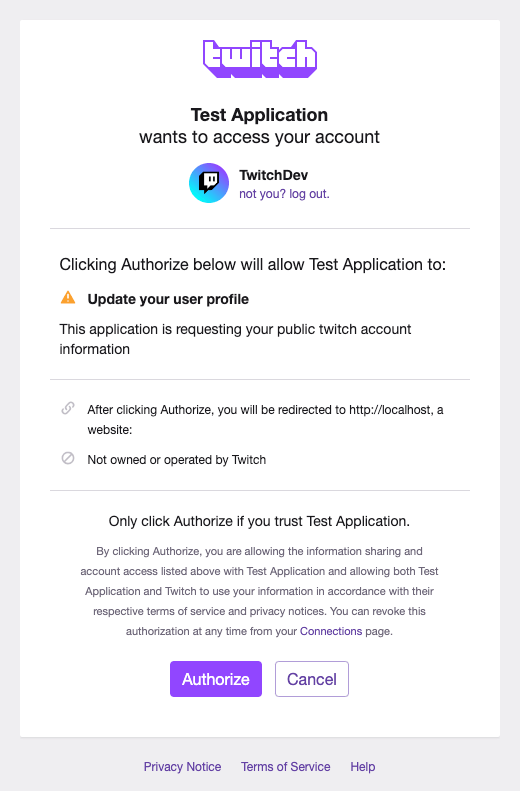
The user is presented with an authorization screen to review the scopes and complete the authorization.
**Obtaining the refresh token/access token pair**
The next step for the client is to obtain the refresh token/access token pair for this current completed authorization. To do that we will utilize the device\_code sent in the response of the first step. This **grant\_type** is the RFC standard **urn:ietf:params:oauth:grant-type:device\_code**, which signals our Authorization server that the client is trying to exchange the device code for a refresh\_token/access\_token pair.
**cURL Request**
| Parameter | Required | Type | Description |
| --- | --- | --- | --- |
| location | Yes | String | URL used to request a token from Twitch. Will always be the same. |
| client\_id | Yes | String | Your app's [registered](https://dev.twitch.tv/docs/authentication/register-app.md) client ID. |
| scopes | Yes | String | A space-delimited list of scopes. The APIs that you're calling identify the scopes you must list. You must URL encode the list. |
| device\_code | Yes | String | The code that will authenticate the user. |
| grant\_type | Yes | String | Must be set to `urn:ietf:params:oauth:grant-type:device_code`. |
```bash
curl --location 'https://id.twitch.tv/oauth2/token' \
--form 'client_id=""' \
--form 'scopes=""' \
--form 'device_code=""' \
--form 'grant_type="urn:ietf:params:oauth:grant-type:device_code"'
```
**Response**
| Parameter | Type | Description |
| --- | --- | --- | --- |
| access\_token |String | The authenticated token, to be used for various API endpoints and EventSub subscriptions. |
| expires\_in | Int | Time until the code is no longer valid. |
| refresh\_token | String | A token used to refresh the access token. |
| scope | String | An array of the scopes requested. |
| token\_type | String | Will generally be "bearer". |
```json
{
"access_token": "",
"expires_in": ,
"refresh_token": "",
"scope": [
""
],
"token_type": "bearer"
}
```
Once the access\_token and refresh\_tokens are received, the client should store these tokens for future exchange token calls using the refresh\_token grant type which is highlighted in the step 5.
Before the user completes the authorization, the client cannot obtain the tokens, in this scenario we will send the following response when the client attempts to obtain the token using the device code.
```json
{
"status": 400,
"message": "authorization_pending"
}
```
The device_code is one time use only, once the device_code has been used to obtain the tokens the client will receive the following response from the authorization server.
```json
{
"status": 400,
"message": "invalid device code"
}
```
Finally a client can keep using the refresh\_token grant to exchange a refresh\_token for a new access\_token. As mentioned earlier the refresh\_token is **one time use only** and will be invalid once the token is exchanged. The client will then be presented with the following response if used more than once.
```json
{
"status": 400,
"message": "Invalid refresh token"
}
```
## Examples of the four flows
If you don't want to write code to test the OAuth flows in this topic, try the following options. Before continuing, you'll need to [register an app](https://dev.twitch.tv/docs/authentication/register-app.md) to get a client ID and secret that you can use below. When registering your app, use `http://localhost:3000` for your redirect URI.
### Implicit flow example
Open your favorite browser and enter the following URI in the address bar. Substitute your client ID for the placeholder string.
```
https://id.twitch.tv/oauth2/authorize?response_type=token&client_id=&redirect_uri=http://localhost:3000&scope=channel%3Amanage%3Apolls+channel%3Aread%3Apolls&state=c3ab8aa609ea11e793ae92361f002671
```
If you're not already signed in to your Twitch account, you'll be asked to sign in. If this client ID hasn't previously requested access to your Poll resource, you'll be asked to give consent. If you want to always force consent, include the *force\_verify* query parameter.
If you consented, the address bar is set to your redirect URI and it contains the access token (see *access\_token* in the URI's fragment).
```
http://localhost:3000/#access_token=wt6oxekssgvj53dkf38grzyzh2xe&scope=channel%3Amanage%3Apolls+channel%3Aread%3Apolls&state=c3ab8aa609ea11e793ae92361f002671&token_type=bearer
```
### Authorization code flow example
Open your favorite browser and enter the following URI in the address bar. Substitute your client ID for the placeholder string.
```
https://id.twitch.tv/oauth2/authorize?response_type=code&client_id=&redirect_uri=http%3A%2F%2Flocalhost%3A3000&scope=channel%3Amanage%3Apolls+channel%3Aread%3Apolls&state=c3ab8aa609ea11e793ae92361f002671
```
If you're not already signed in to your Twitch account, you'll be asked to sign in. If this client ID hasn't previously requested access to your Poll resource, you'll be asked to give consent. If you want to always force consent, include the *force\_verify* query parameter.
If you consented, the address bar is set to your redirect URI and it contains the authorization code (see the *code* parameter).
```
http://localhost:3000/?code=17038swieks1jh1hwcdr36hekyui&scope=channel%3Amanage%3Apolls+channel%3Aread%3Apolls&state=c3ab8aa609ea11e793ae92361f002671
```
Open a terminal window and enter the following cURL POST command (you'll need [cURL installed](https://curl.se/download.html) on your computer). Replace the placeholder strings and the authorization code with your values.
```bash
curl -X POST 'https://id.twitch.tv/oauth2/token' \
-H 'Content-Type: application/x-www-form-urlencoded' \
-d 'client_id=&client_secret=&code=17038swieks1jh1hwcdr36hekyui&grant_type=authorization_code&redirect_uri=http://localhost:3000'
```
The response contains a JSON object with the access token and refresh token.
```json
{
"access_token": "fvc8xeeajsh0zkunt6fby67rnyux1",
"expires_in": 15485,
"refresh_token": "e2zyj5itwcmlg2clbcnd1wqlibypzjjydwu26bfhqhx1klp2o",
"scope": [
"channel:manage:polls",
"channel:read:polls"
],
"token_type": "bearer"
}
```
### Client credentials flow example
Open a terminal window and enter the following cURL POST command (you'll need [cURL installed](https://curl.se/download.html) on your computer).
```bash
curl -X POST 'https://id.twitch.tv/oauth2/token' \
-H 'Content-Type: application/x-www-form-urlencoded' \
-d 'client_id=&client_secret=&grant_type=client_credentials'
```
The response contains a JSON object with the access token.
```json
{
"access_token": "jostpf5q0puzmxmkba9iyug38kjtg",
"expires_in": 5011271,
"token_type": "bearer"
}
```
### Device code flow example
The device will make a cURL request with requested scopes.
```bash
curl -X POST 'https://id.twitch.tv/oauth2/device' \
-H 'Content-Type: application/x-www-form-urlencoded' \
-d 'client_id=&scopes='
```
The response will contain a URI.
```json
{
"device_code": "ikeYZs43KdrWPIO363GM8QIdLofILoCyFEzjlQ91",
"expires_in": 1800,
"interval": 5,
"user_code": "ABCDEFGH",
"verification_uri": "https://www.twitch.tv/activate?public=true&device-code=ABCDEFGH"
}
```
The device will show the user the URI to navigate to, in the above example it's `https://www.twitch.tv/activate?public=true&device-code=ABCDEFGH`.
Once the user has accepted the authorization the device will call
```bash
curl --location 'https://id.twitch.tv/oauth2/token' \
--form'client_id="0mmkby2n450y6ho3s2b4xth9fjggz1"' \
--form'scope="channel:manage:broadcast"' \
--form'device_code="ike3GM8QIdYZs43KdrWPIO36LofILoCyFEzjlQ91"' \
--form'grant_type="urn:ietf:params:oauth:grant-type:device_code"'
```
Which will get a response with the access token and the refresh token.
```json
{
"access_token": "",
"expires_in": 14820,
"refresh_token": "",
"scope": [
"user:edit"
],
"token_type": "bearer"
}
```